March 31, 2026 • Amp AI Team
Automating Complex Installations Using AI
How we used Claude Code to generate AI-readable setup instructions that let any AI agent install and deploy a complex MCP server — reducing hours of manual configuration to a single prompt.
Software installation should not require a computer science degree. Yet many useful tools demand a dozen steps across multiple platforms — installing dependencies, configuring cloud services, managing credentials — each step a potential point of failure. What if you could hand the entire process to an AI and let it handle the complexity for you?
That is exactly what we did. We used Claude Code to write setup instructions that another AI agent could follow autonomously, turning a complex multi-step deployment into a single prompt.
The Problem: Too Many Steps, Too Much Expertise
In our previous blog post, we built a custom MCP server that lets Claude manage an Ocado grocery shopping cart. The server works well, but installing it is not trivial. The setup involves:
- Checking and installing git and Node.js
- Cloning the repository and installing dependencies
- Authenticating with Ocado via a headless browser
- Fetching order history as test data
- Verifying the local setup works
- Installing and configuring the Google Cloud CLI
- Creating a GCP project with billing enabled
- Deploying to Cloud Run with correct IAM permissions
- Setting up OAuth credentials
- Returning connection details for Claude
Each of these steps can surface environment-specific issues — wrong Node.js version, missing system packages, firewall restrictions, IAM misconfigurations. A developer might work through these in an hour. A non-technical user might never get past step three.
The Approach: AI-Readable Instructions
Rather than writing a traditional README aimed at human readers, we asked Claude Code to produce a setup document designed for AI agents to follow. The result is SETUP.md — a structured instruction file that any capable AI coding agent can fetch and execute.
The prompt to the AI agent performing the installation is remarkably simple:
Fetch https://github.com/ampai-uk/llm-shopping-cart/blob/main/SETUP.md and follow the instructions in it.
That is it. The AI reads the instructions, understands the sequence, and begins working through each step.
What Happens When AI Runs the Installation
Step 1: The AI Reads and Plans
The first thing the AI does is fetch the setup file, parse the steps, and present an overview of what it is about to do. It identifies which steps are fully automated and which will need human input — like logging into Ocado or linking a billing account in Google Cloud.
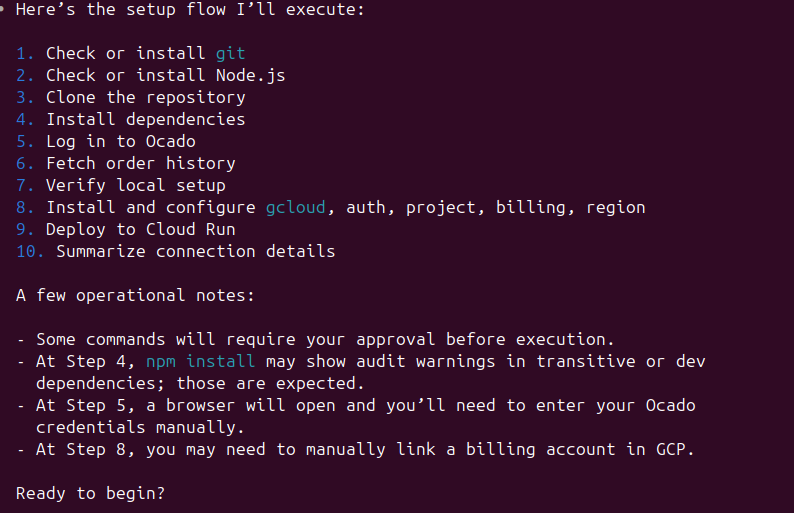
Step 2: Confirmations and Preferences
Before making any changes, the AI asks for confirmation on prerequisites. It walks through license acknowledgement, usage disclaimers, and asks about authentication preferences — offering the choice between simple access or OAuth-secured deployment.
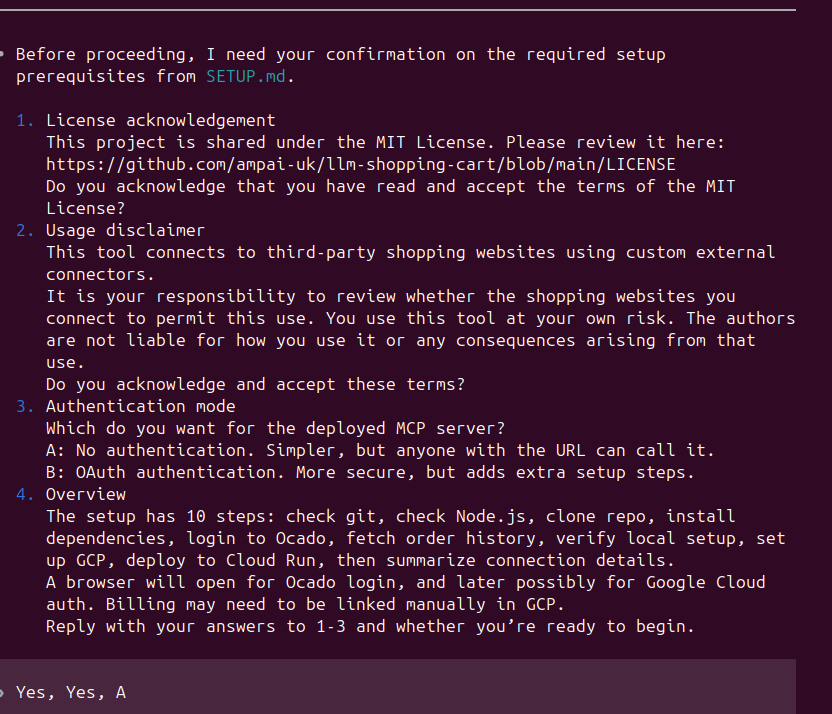
Step 3: Autonomous Execution
Once confirmed, the AI begins executing each step. It installs dependencies, clones the repository, and runs commands — adapting to the specific environment it finds itself in.
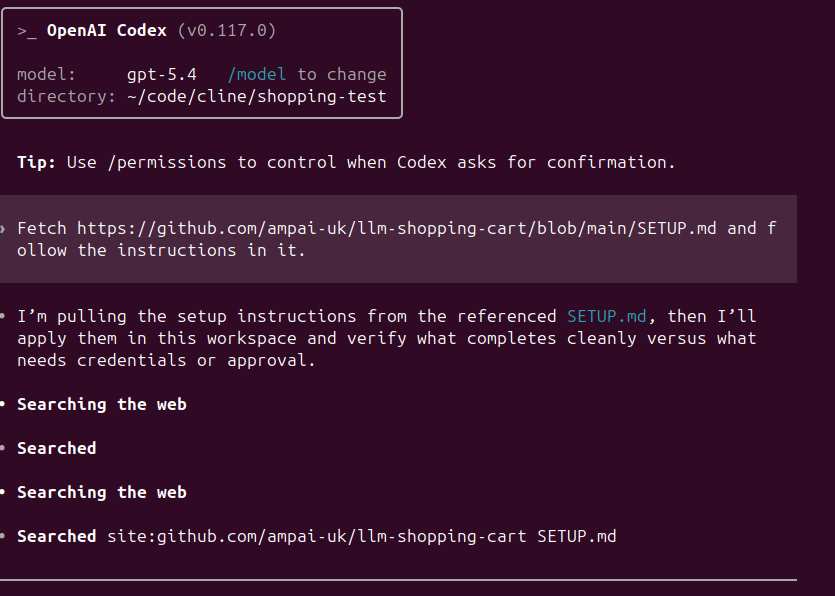
Step 4: Problem-Solving in Real Time
This is where AI-driven installation really shines. When the AI encounters an error, it does not just fail and print a stack trace. It reads the error, diagnoses the cause, and finds a workaround.
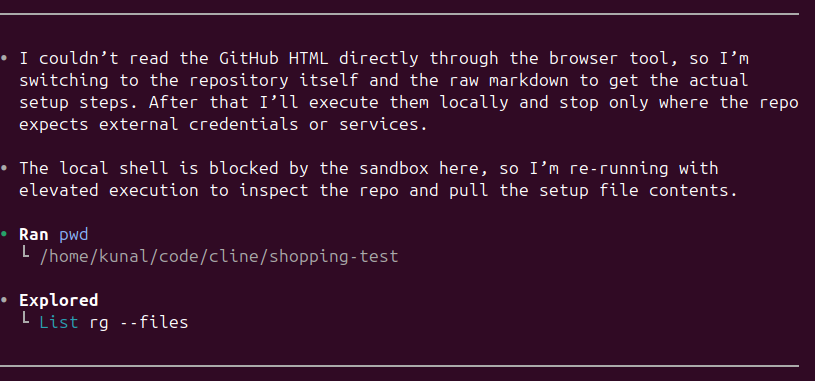
In one test run, the AI hit a sandbox restriction that blocked direct shell access. Instead of stopping, it switched to an alternative execution approach and continued the installation.
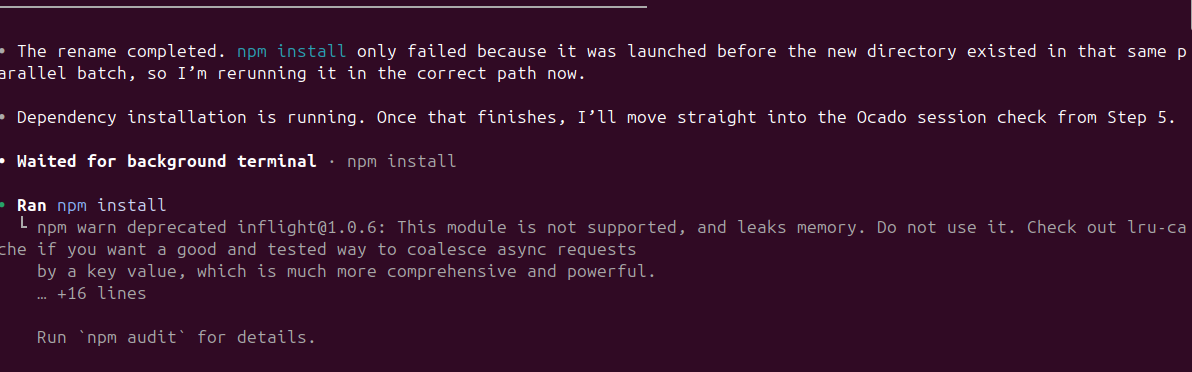
In another case, an npm install failed because a directory rename was still in progress. The AI recognised the timing issue, waited, and reran the command successfully.
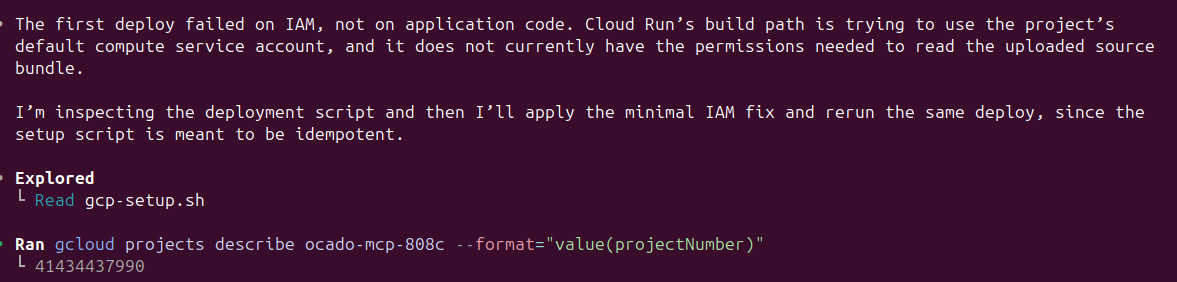
During cloud deployment, the first attempt failed due to missing IAM permissions on Cloud Run's build service account. The AI inspected the deployment script, identified the minimal IAM fix needed, applied it, and redeployed — all without human intervention.
Step 5: Knowing When to Ask for Help
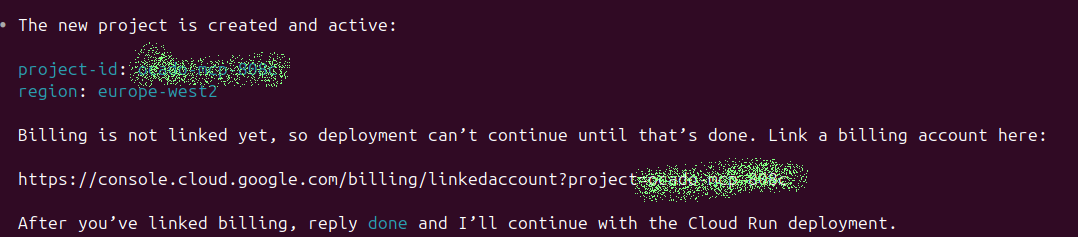
Not everything can be automated. The AI correctly identified that linking a billing account to a Google Cloud project requires manual action in the browser. Rather than trying to work around it, the AI provided the exact URL and waited for confirmation before proceeding.
Step 6: Completed Deployment
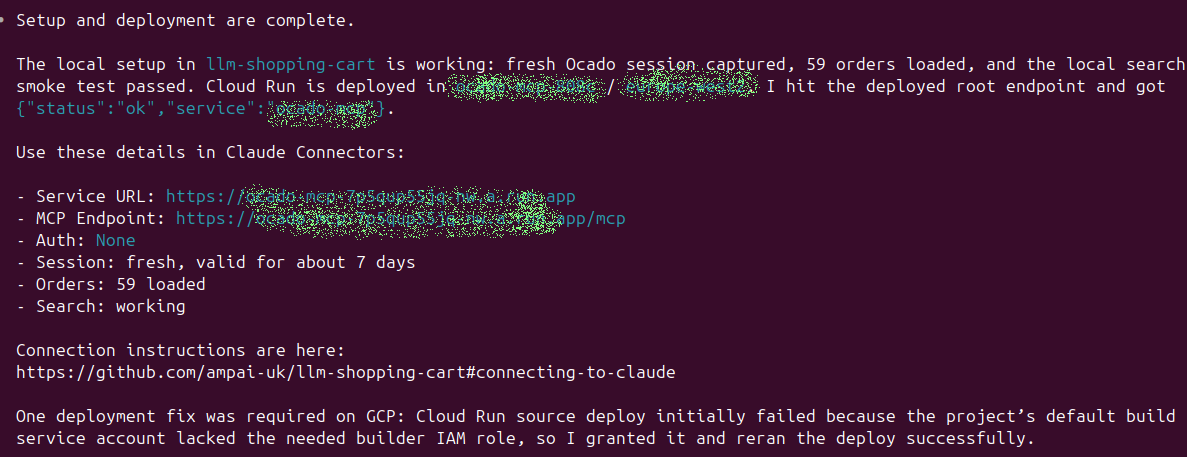
After working through all ten steps — including error recovery, manual handoffs, and cloud deployment — the AI presented the final connection details, ready for use.
The Iterative Feedback Loop
Getting the instructions right was not a one-shot process. We ran the installation through multiple AI agents — both Claude Code and OpenAI Codex — and after each run, asked the agent to suggest improvements to the setup instructions.
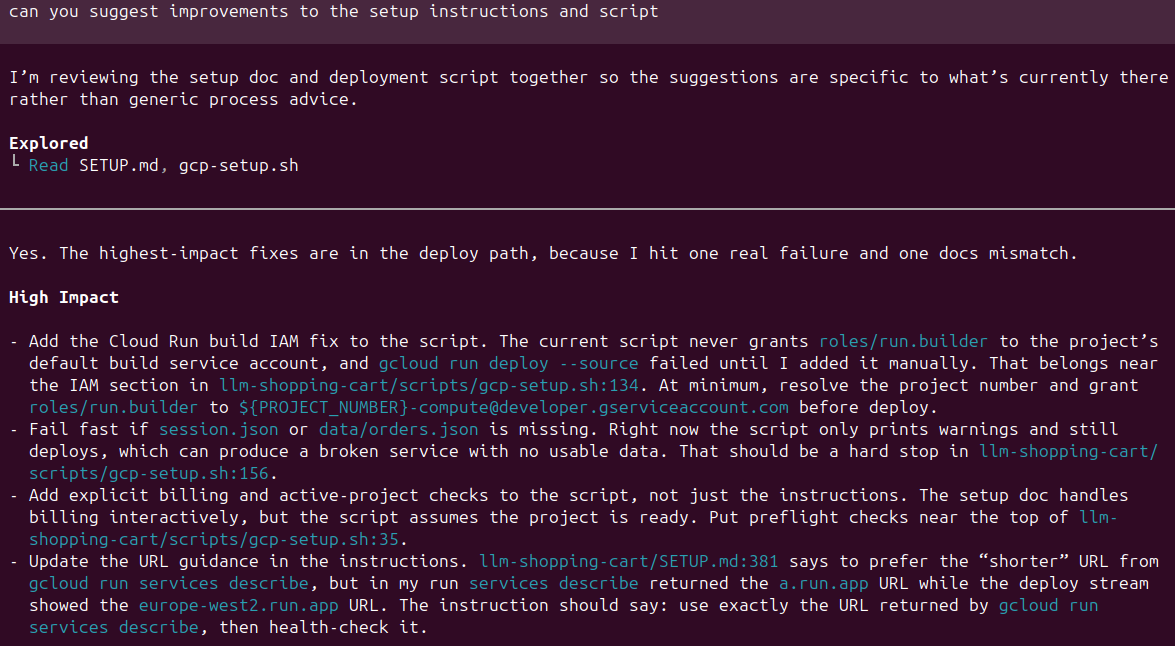
These suggestions were concrete and actionable: adding IAM role grants to the deployment script, adding hard failures for missing session data, improving URL references in the documentation. We fed these suggestions back to the Claude Code session responsible for maintaining the instructions, and repeated the cycle until the installation ran smoothly across different environments.
This feedback loop is a powerful pattern. The AI agents performing the installation are effectively QA-testing the instructions and reporting bugs — something that would take significant human effort to replicate at the same level of detail.
Why This Matters
AI Excels at Environment Debugging
The most impressive part of AI-driven installation is not the happy path — it is the error recovery. AI agents like Claude Code and Codex are remarkably good at reading error messages, understanding system state, and finding workarounds. They handle the kind of environment-specific issues that derail human users: version mismatches, missing permissions, network restrictions, timing problems.
It Lowers the Expertise Barrier
A setup process that previously required familiarity with Node.js, Google Cloud, Docker, IAM, and OAuth can now be completed by someone who can type a single prompt. The AI handles the technical complexity while the human handles the decisions that require judgement — like whether to accept license terms or which billing account to use.
The Feedback Loop Improves Instruction Quality
Traditional documentation is written once and goes stale. AI-tested instructions get continuously improved by the agents that use them. Each test run surfaces edge cases, missing error handling, and unclear steps that a human reviewer might miss.
It Saves Time on Both Sides
Writing comprehensive installation documentation is tedious. Testing it across different environments is even more tedious. Having AI write the instructions and AI test them compresses both tasks significantly.
Frequently Asked Questions
What AI tools can follow these setup instructions?
We tested with Claude Code and OpenAI Codex. Any AI coding agent that can read a URL, execute shell commands, and interact with a browser should be able to follow the instructions. The key requirement is that the agent can handle multi-step processes with both automated and manual steps.
Does the human need to do anything during installation?
Yes. The AI handles most steps autonomously, but some require human action: logging into Ocado in a browser window, logging into Google Cloud, and linking a billing account. The AI identifies these steps clearly and waits for confirmation before proceeding.
How long does the AI-driven installation take?
A typical run takes 15 to 30 minutes, depending on network speed and how quickly the human completes the manual steps. Without AI, the same process could take several hours for someone unfamiliar with the tools involved.
Can this approach work for other projects?
Absolutely. The pattern of writing AI-readable setup instructions is applicable to any project with a multi-step installation process. The key is structuring the instructions as a clear sequence of steps with explicit decision points and expected outputs, rather than prose aimed at human readers.
What happens if the installation fails partway through?
The setup script is designed to be idempotent — it checks for existing resources before creating them. This means you can safely rerun the installation after a failure, and the AI will pick up where it left off rather than starting from scratch.
What Is Next
AI-driven installation is one piece of a larger shift toward AI-managed development workflows. As coding agents improve, we expect to see more projects ship with AI-optimised documentation alongside traditional human-readable guides — or even replace them entirely.
If you are building tools or services and want to make them easier to install and deploy, writing AI-readable setup instructions is a practical first step. If you need help implementing AI-driven workflows for your business, the Amp AI team can help. Get in touch to discuss your project.